
Are you ruminating on how to permanently delete your Gmail account? If so, you’ve come to the right place. This article will educate you how to purge your Google Gmail account from the internet forever.
BUT BEFORE I CONTINUE let me quickly bring to your knowledge some of the things you will experience when you delete your Google Gmail account. See Below.
Deleting your Gmail account will delete all your emails and close your inbox.
Note: Emails will still exist in the email accounts of the people with whom you’ve corresponded, unless they too have deleted their email accounts.
If anybody tries to email you at that address after you’ve deleted the account, the email will bounce back.

These are things you need to consider before deleting your Gmail account
1. You will lose access to your account.
When you delete your Gmail account, you will no longer be able to send or receive email with that email address. Make sure to inform all relevant parties before shutting down your Gmail account.
2. You might lose access to 3rd party services associated with your Gmail account.
If your Gmail account is associated with any other accounts, you might have a bad time. Make sure you update your email address information with these accounts so you don’t encounter the following bad scenarios:
Bad scenario #1: Your Gmail account is associated with your social media accounts and you can’t reset your password or recover your account.
Even worse scenario #2: Your Gmail account is linked to your bank account. Three forms of ID and 14 hours of customer service calls later, you end up with a splitting migraine.
3. You might want to download a backup of all your emails.
Before you hit the big red button and delete your Gmail account, you might want to download all of your data. Google has a great article to show you how to do this in their Google Accounts Help Center: How to download your data.
Unless, of course, your intension is to destroy every trace of it. Then by all means, fire away!
4. Deleting your Gmail account will not free up your username.
You Will Like: How To Recover A Forgotten Gmail Password | Gmail Password Recovery
Nobody (including you) will be able to use your Gmail username (username@gmail.com) in the future. This ensures nobody can impersonate you at your old email account.
5. Deleting your Gmail account will not delete your Google Account.
Your Google Account will remain associated with things like your Search History and YouTube account.
6. It’s possible to recover your deleted Gmail account—but act fast!
Want to retrieve your deleted emails? You have a window of a few weeks to attempt to recover a deleted Gmail account. Find out how to recover a recently deleted Gmail account.
Do you still want to delete your Gmail account? See steps below.
How To Delete Your Google Gmail Account
Sign in to your Google Account by going to myaccount.google.com and clicking Sign in.

Enter your Gmail credentials and click Sign in.

On the My Account page, under Account Preferences, click Delete your account or services.

Click Delete products.

Re-enter your password, then click Sign in.

Next to your Gmail account, click the trash can.

Enter a new primary email address and your current password and click REMOVE GMAIL. (It’s the big red button!)

You will see this message with instructions telling you to open your email. Click OK, got it.
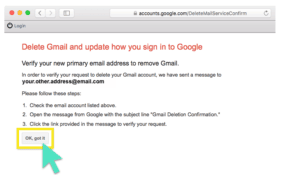
Open the Gmail Removal Confirmation email in your email. Click the confirmation link.

You will be asked to confirm that you want to remove your Gmail account by entering your password. Enter your password and click Confirm.

You will see a confirmation message like this:

Congratulations! You have successfully deleted Gmail from your Google account.


