
Delete / Clear Facebook Search History. Clearing your Facebook search history is not a difficult process. In fact, you can do that right away.
Do you know that just as your browsing history is saved on Google, Facebook also saves and keeps stock of recent search activity?
The advantage of this is that you can easily get back to pages or groups you visited recently or your most frequently visited pages.
Also, whatever and whoever you search for on Facebook is totally a private matter provided your account is kept private and free from the invasion of people.
Are you wondering why you should clear your Facebook search history in the first place? The reason is simple, someone could have access to your device and account as well.
Now there are some details you rather leave private, if you feel your recently visited groups and pages should remain private you sure will have to leave no trace of it and, this is simply done by clearing the search history.
Before we proceed, you should know that How you get to your search history varies with devices. Therefore if you are using an iOS device, your web interface will be different from that of a user using an Android device.d
Are you ready? In this post, we bring you how to delete/clear your Facebook search history. All that is expected of you is to simply follow our simple guide below.
Are you ready to learn about it? If yes, then read on.
Quick Way to Delete / Clear Facebook Search History on The Web
Step 1 ====> Log in to your Facebook account
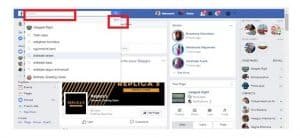
Step 2 ====> Then click on the Facebook search bar
Step 3 ====> Now click on the Edit option in the top-right corner of the Facebook Search bar.
Step 4 ====> Now click on the clear search history at the top right corner of that page.
Also Read: Facebook Lite – Facebook Lite Install | Facebook Lite Free Download
Deleting Facebook Search History on Desktop
Do it on the desktop:
- Click on the Facebook search bar.
- Click on the Edit option in the top-right corner of the Facebook search bar.

 Alternatively, you can go to your timeline page and click View Activity Log. Then click More (below Comments) and choose Search from the list.
 - Once you’re on the search history page, you can delete individual search queries.
- To delete a search, click the edit button next to the lock. Click Delete.
- A delete confirmation dialog box will appear. Click Remove Search.


- To delete all the searches at once, look for the “Clear Searches” option on the top of the page.
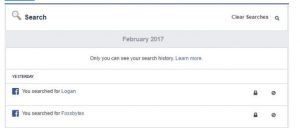
Note: Once deleted, you won’t be able to get back your search history.
Deleting the searches from the activity log will also remove them from everywhere else they appear. For example, this will also erase the Facebook search bar’s recent searches drop-down list after you delete the names from here.
Delete Facebook Search history from your smartphone:
- On your phone, open the Facebook app.
- Now swipe and go to the section with three horizontal lines.
- Scroll down till you find the Activity Log on the list. Tap Activity Log.
- Tap Filter on the Activity Log screen.
- Scroll down the list and look for Search. Tap Search.
- Now, your Facebook Search history will be displayed in front of you.


- To remove a search, tap the cross button for the search. Then, tap Remove.
- To delete your Facebook Search history in a single go, tap Clear Searches on the top. Tap Confirm on the next screen.
That is it, guys. If this article was interesting to you, Please share this article with your friends with the share button below. For further questions, kindly use the comment section below. Thanks.


